

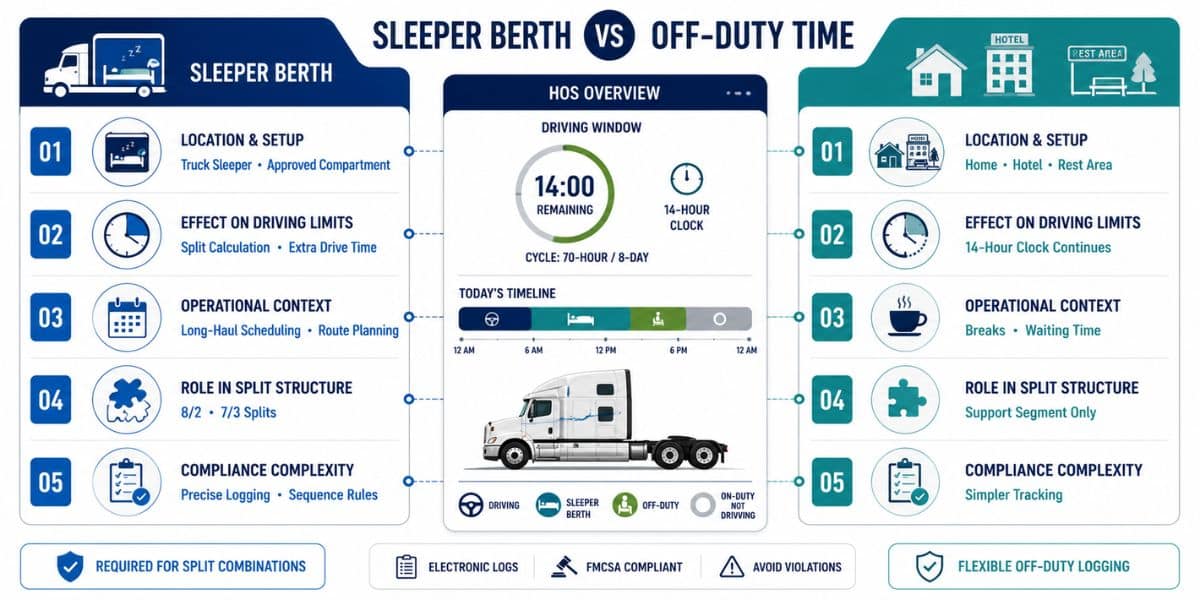

Sleeper berth and off-duty time differ in how they affect driving limits, with the former allowing rest inside a truck compartment and pausing the 14-hour window in 8/2 or 7/3 splits. Off-duty periods represent general rest that does not stop the clock, even though both fall under federally regulated Hours of Service rules for safety.
Periods logged as off-duty apply when a driver is completely free from work responsibilities and can use time without restriction. Use of the sleeper berth, however, provides more strategic control over available driving hours compared to standard rest periods.
Regulatory enforcement ensures both categories support fatigue management and operational discipline in trucking. Incorrect logging in electronic systems can result in violations, financial penalties, and negative safety scores, making accurate usage essential.
What Is Sleeper Berth in Hours of Service (HOS)?
Sleeper berth is a duty status under Hours of Service (HOS) regulations that allows commercial drivers to take rest inside a truck’s built-in sleeping compartment. The compartment must meet FMCSA requirements to qualify as an approved space for rest.
Use of this status applies only to time spent inside the designated sleeping area installed in the vehicle. Records are maintained separately in Electronic Logging Devices (ELDs) to distinguish them from other duty statuses.
Within HOS tracking, this category functions as one of the four primary duty statuses used to monitor driver activity. Proper classification ensures accurate documentation under federal compliance standards.
How Does Sleeper Berth Work Under FMCSA Rules?
Sleeper berth functions through a structured split system that adjusts how driving limits are calculated under HOS regulations.
- Split Structure: Required 10-hour break can be divided into 8/2 or 7/3 combinations, with one qualifying segment inside the sleeper compartment.
- Pairing Requirement: Both segments must align correctly in sequence for eligibility, forming a valid combination under FMCSA standards.
- Window Adjustment: The longer qualifying segment shifts the 14-hour driving window, changing how available hours are counted.
- Recalculation Logic: Driving duration before and after each segment is recalculated based on the split rather than the original shift start.
- Minimum Limits: Each segment must meet required hour thresholds to remain valid and avoid disqualification.
- Continuity Condition: Any interruption breaks eligibility and cancels the split benefit.
- ELD Tracking: Electronic systems automatically validate entries and update available hours after correct pairing.
What Is Off-Duty Time in HOS Regulations?
Off-duty time is the period during which a commercial driver is completely relieved from all work responsibilities under Hours of Service (HOS) regulations. No driving, monitoring, loading, or job-related activity is allowed during this time.
Drivers can spend this period anywhere, including at home, rest areas, or outside the vehicle, without restrictions tied to the truck. This status simply records non-working time and does not require a specific location or equipment.
Electronic Logging Devices (ELDs) track this category separately from other duty statuses to maintain accurate records. Proper logging ensures compliance with FMCSA rules and supports clear duty status classification.
How Is Off-Duty Time Logged and Used?
Off-duty status records non-working periods where no job-related responsibility is performed and no operational task is assigned.
- Status Activation: Entry begins once all work obligations end, including driving, supervision, or vehicle-related duties.
- Free Movement: Location is unrestricted, allowing use of personal space, home, or any rest area without limitations.
- Break Compliance: A 30-minute interruption after 8 hours of driving can be satisfied using this status without requiring a specific setup.
- Clock Continuation: The 14-hour driving window continues running, reducing available driving duration despite inactivity.
- Usage Context: Commonly applied during meals, waiting phases, or personal time between assignments.
- ELD Recording: Electronic Logging Devices capture this category separately to maintain accurate duty status history.
What Are the Key Differences Between Sleeper Berth and Off-Duty Time?
Differences between these two duty statuses come from how driving limits, flexibility, and compliance conditions are handled under HOS regulations.

Location and Setup
Rest taken inside a federally approved truck compartment qualifies under sleeper berth status, linking eligibility directly to vehicle infrastructure. Freedom of movement applies to off-duty status, allowing presence at home, rest areas, or any location without equipment requirements.
Effect on Driving Limits
Split combinations can shift how the 14-hour window is calculated, creating additional driving availability in certain scenarios. Standard off-duty logging does not change this calculation, so the driving window continues reducing regardless of inactivity.
Operational Context
Long-haul scheduling often depends on sleeper berths to align rest with delivery timelines and distance constraints. Personal breaks, waiting periods, or non-working intervals are typically recorded under “off-duty” without strategic timing considerations.
Role in Split Structure
Eligibility for structured combinations like 8/2 or 7/3 depends on sleeper berths as a required component within the calculation. Supporting segments may include off-duty periods, but they cannot independently form a valid split.
Compliance Complexity
Strict sequencing and accurate recording are necessary to maintain validity under sleeper berth rules. Simpler tracking applies to off-duty status, reducing the likelihood of technical violations during inspections.
When Should Drivers Choose Sleeper Berth vs Off-Duty Time?
Choice between these two duty statuses depends on trip length, scheduling needs, and how driving limits must be managed during operations.
| Scenario | Sleeper Berth | Off-Duty Time |
| Long-Haul Routes | Supports split combinations that help extend driving availability across extended distances | Does not adjust driving window, leading to reduced available hours during long trips |
| Short Breaks | Not necessary for quick stops or informal pauses | Ideal for meal breaks, quick stops, or personal time without structured requirements |
| Waiting Delays | Can preserve driving hours if logged strategically during long delays | Continues reducing the 14-hour window despite inactivity |
| Team Driving | Allows rest inside the vehicle while the other driver continues movement | Not suitable for in-vehicle rest during team operations |
| Home Time | Not applicable due to compartment requirement inside the truck | Suitable for extended rest away from work and vehicle |
| Schedule Flexibility | Enables structured planning with split logic for optimized routing | Provides simple logging without influencing trip planning |
How to Stay HOS-Compliant With Matrack?
Matrack helps maintain HOS compliance by automatically tracking duty status changes through its integrated Electronic Logging Device (ELD) system. Real-time data recording ensures accurate logging of driving, on-duty, sleeper berth, and off-duty categories without manual errors.
Built-in alerts notify drivers and fleet managers about approaching limits, reducing the risk of violations related to the 14-hour window or required breaks. These notifications support timely decision-making during trips and prevent unintentional non-compliance.
Centralized dashboards provide visibility into driver activity, making it easier to monitor logs, identify issues, and maintain audit-ready records. Consistent tracking and reporting through Matrack simplify compliance management across daily operations.
Frequently Asked Questions
Why does the difference matter for compliance and safety?
Accurate duty status selection ensures compliance with Hours of Service regulations and prevents violations during inspections. Proper classification also supports fatigue control, reducing the risk of accidents and improving overall safety.
Does sleeper berth pause the 14-hour clock?
Sleeper berth can pause the 14-hour driving window only when used in valid split combinations such as 8/2 or 7/3. Without proper pairing, the driving window continues without any adjustment.
Can off-duty time replace sleeper berths?
Off-duty time cannot function as a primary component in split calculations that require sleeper berth. It may contribute as a secondary segment but cannot independently qualify for a valid split.
What happens if duty status is logged incorrectly in an ELD?
Incorrect entries can lead to Hours of Service violations, fines, and failed inspections. Repeated errors may also impact CSA scores and overall compliance records.
Which option works better for long-haul operations?
Sleeper berth supports structured scheduling and allows adjustments to driving limits during extended trips. Off-duty status is more suitable for simple breaks without influencing driving availability.
How do split sleeper berth rules work?
Split rules allow required rest to be divided into two qualifying segments that meet specific hour combinations. Correct sequencing ensures driving hours are recalculated without violating regulatory limits.
The post Sleeper Berth vs Off-Duty Time: What Are The Key Differences? first appeared on Matrackinc.